 WhatsApp us

Multi step signup form in PHP & MySQL
- Tech Area
- Last updated on: January 8, 2026
In this tutorial, We will see how to create multi step signup form using HTML, CSS and JS in PHP and MySQL.
Files used in this tutorial:
1- connection.php (database connection file)
2- index.php (multi step form)
3- signup.php
Below are the step by step process of how to create multi step signup form in PHP and MySQL.
Step 1: Create a Database connection
In this step, create a new file connection.php to create database connection.
connection.php
<?php
$server = "localhost";
$username = "root";
$password = "";
$database = "college_db";

// Create a connection to the database
$conn = new mysqli($server, $username, $password, $database);

// Check if the connection was successful
if ($conn->connect_error) {
    die("Connection failed: " . $conn->connect_error);
}
?>
Step 2: Create a file for registration form
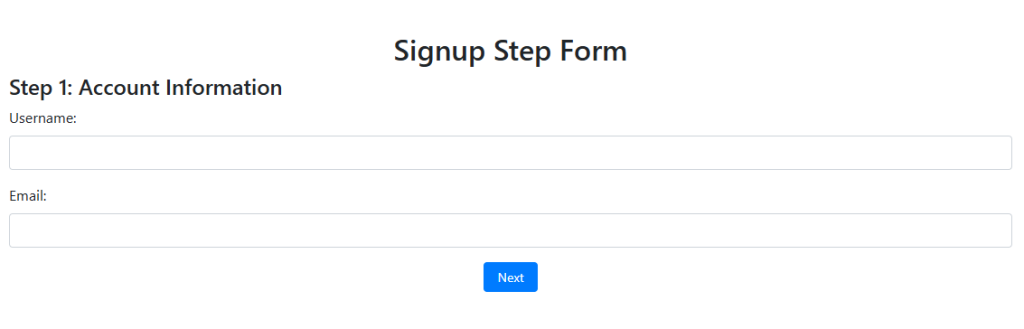
Now create a new file index.php This is the main file used for multi step registration form and submit data into the database.
This screenshot shows the multi step registration form.
index.php
<!DOCTYPE html>
<html lang="en">
<head>
    <meta charset="UTF-8">
    <meta name="viewport" content="width=device-width, initial-scale=1.0">
    <title>Signup Step Form</title>
    <!-- Bootstrap CSS -->
    <link href="https://stackpath.bootstrapcdn.com/bootstrap/4.5.2/css/bootstrap.min.css" rel="stylesheet">
    <!-- jQuery -->
    <script src="https://code.jquery.com/jquery-3.5.1.min.js"></script>
    <!-- jQuery Validation Plugin -->
    <script src="https://cdnjs.cloudflare.com/ajax/libs/jquery-validate/1.19.3/jquery.validate.min.js"></script>
    <!-- Bootstrap JS -->
    <script src="https://stackpath.bootstrapcdn.com/bootstrap/4.5.2/js/bootstrap.bundle.min.js"></script>
    <style>
        .step {
            display: none;
        }
        .step.active {
            display: block;
        }
        .step-button-container {
            display: flex;
            justify-content: center;
            gap: 10px; /* space between buttons */
        }
        .step-button {
            width: auto;
            font-size: 0.875rem; /* smaller text */
            padding: 5px 15px; /* smaller padding */
        }
        .error{
            color: red;
        }
    </style>
</head>
<body>

<div class="container mt-5">
    <h2 class="text-center">Signup Step Form</h2>
    <form id="signupForm" method="POST" action="signup.php">
        <!-- Step 1 -->
        <div class="step active" id="step-1">
            <h4>Step 1: Account Information</h4>
            <div class="form-group">
                <label for="username">Username:</label>
                <input type="text" class="form-control" id="username" name="username" required>
            </div>
            <div class="form-group">
                <label for="email">Email:</label>
                <input type="email" class="form-control" id="email" name="email" required>
            </div>
            <div class="step-button-container">
                <button type="button" class="btn btn-primary step-button" id="next-1">Next</button>
            </div>
        </div>

        <!-- Step 2 -->
        <div class="step" id="step-2">
            <h4>Step 2: Personal Information</h4>
            <div class="form-group">
                <label for="fullName">Full Name:</label>
                <input type="text" class="form-control" id="fullName" name="fullName" required>
            </div>
            <div class="form-group">
                <label for="dob">Date of Birth:</label>
                <input type="date" class="form-control" id="dob" name="dob" required>
            </div>
            <div class="step-button-container">
                <button type="button" class="btn btn-secondary step-button" id="prev-2">Previous</button>
                <button type="button" class="btn btn-primary step-button" id="next-2">Next</button>
            </div>
        </div>

        <!-- Step 3 -->
        <div class="step" id="step-3">
            <h4>Step 3: Set Password</h4>
            <div class="form-group">
                <label for="password">Password:</label>
                <input type="password" class="form-control" id="password" name="password" required>
            </div>
            <div class="form-group">
                <label for="confirmPassword">Confirm Password:</label>
                <input type="password" class="form-control" id="confirmPassword" name="confirmPassword" required>
            </div>
            <div class="step-button-container">
                <button type="button" class="btn btn-secondary step-button" id="prev-3">Previous</button>
                <button type="submit" class="btn btn-success step-button">Submit</button>
            </div>
        </div>
    </form>
</div>

<script>
    $(document).ready(function () {
        // Add validation rules using jQuery Validation Plugin
        $('#signupForm').validate({
            rules: {
                username: {
                    required: true,
                    minlength: 3
                },
                email: {
                    required: true,
                    email: true
                },
                fullName: {
                    required: true,
                    minlength: 3
                },
                dob: {
                    required: true
                },
                password: {
                    required: true,
                    minlength: 6
                },
                confirmPassword: {
                    required: true,
                    minlength: 6,
                    equalTo: "#password"
                }
            },
            messages: {
                username: {
                    required: "Please enter your username",
                    minlength: "Your username must be at least 3 characters long"
                },
                email: {
                    required: "Please enter your email",
                    email: "Please enter a valid email address"
                },
                fullName: {
                    required: "Please enter your full name",
                    minlength: "Your full name must be at least 3 characters long"
                },
                dob: {
                    required: "Please enter your date of birth"
                },
                password: {
                    required: "Please enter a password",
                    minlength: "Your password must be at least 6 characters long"
                },
                confirmPassword: {
                    required: "Please confirm your password",
                    minlength: "Your password must be at least 6 characters long",
                    equalTo: "Passwords do not match"
                }
            },
            submitHandler: function (form) {
                form.submit(); // Submit the form if validation passes
            }
        });

        // Navigation between steps
        $('#next-1').on('click', function () {
            if ($('#signupForm').valid()) {
                $('#step-1').removeClass('active');
                $('#step-2').addClass('active');
            }
        });

        $('#prev-2').on('click', function () {
            $('#step-2').removeClass('active');
            $('#step-1').addClass('active');
        });

        $('#next-2').on('click', function () {
            if ($('#signupForm').valid()) {
                $('#step-2').removeClass('active');
                $('#step-3').addClass('active');
            }
        });

        $('#prev-3').on('click', function () {
            $('#step-3').removeClass('active');
            $('#step-2').addClass('active');
        });
    });
</script>
</body>
</html>
Step 3: Create a file for submit registration form data
Now create a new file signup.php This file used for insert multi step registration form data into the database.
<?php
// Include the database connection
include('connection.php');

// Get form data
$user = $_POST['username'];
$email = $_POST['email'];
$fullName = $_POST['fullName'];
$dob = $_POST['dob'];
$password = $_POST['password'];
$confirmPassword = $_POST['confirmPassword'];

// Validate password match
if ($password !== $confirmPassword) {
    echo "Passwords do not match.";
    exit();
}

// Hash the password before storing it
$hashedPassword = password_hash($password, PASSWORD_BCRYPT);

// Prepare the SQL statement to insert the data
$sql = "INSERT INTO users (username, email, full_name, dob, password) VALUES (?, ?, ?, ?, ?)";

$stmt = $conn->prepare($sql);
$stmt->bind_param("sssss", $user, $email, $fullName, $dob, $hashedPassword);

// Execute the query
if ($stmt->execute()) {
    echo "Signup successful!";
} else {
    echo "Error: " . $stmt->error;
}

// Close the connection
$stmt->close();
$conn->close();
?>Download Source Code

Join 20,000+ subscriber