 WhatsApp us

Generate Dynamic PAN application form PDF from html form in PHP
- Tech Area
- Last updated on: January 8, 2026
In this tutorial, Learn how to generate a dynamic PAN (Permanent Account Number) application form in PDF format using data submitted through an HTML form in PHP. This guide demonstrates how to capture user input, process it on the server, and create a downloadable or printable PDF using FPDF library.
Files used in this tutorial:
1- index.php (Contains the HTML application form)
2- generate-pdf.php (Handles the form submission and generates the dynamic PDF)
Below are the step by step process to create dynamic PDF in PHP.
Step 1: Create the HTML Application Form
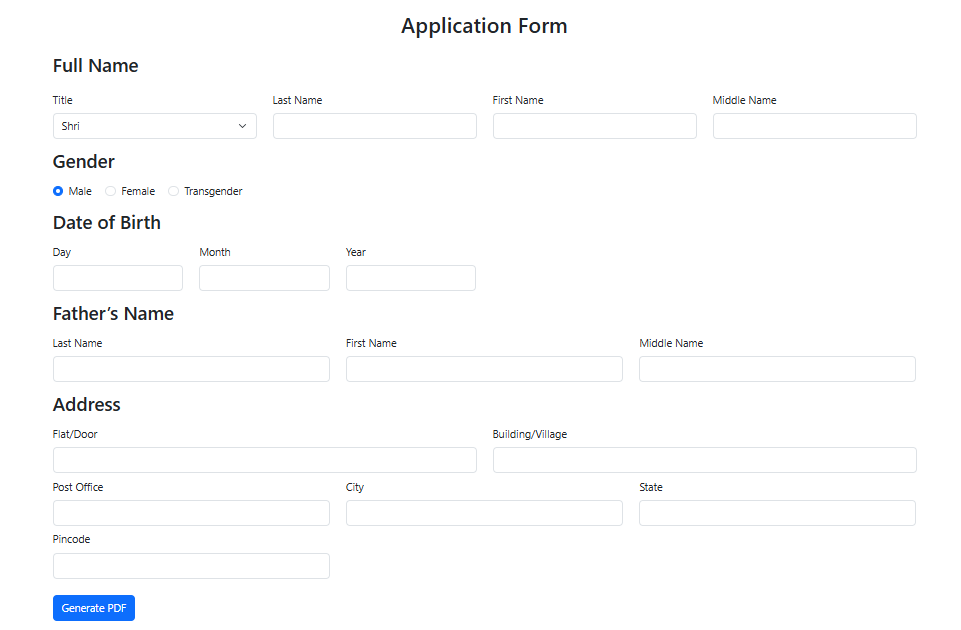
Start by creating a new file named index.php. This file contains the user-facing form that collects PAN application details.
This screenshot shows the application form.
index.php
<link href="https://cdn.jsdelivr.net/npm/bootstrap@5.3.0/dist/css/bootstrap.min.css" rel="stylesheet">
<head>
    <title>Pan Application Form</title>
</head>
<div class="container mt-5">
    <h2 class="text-center mb-4">Application Form</h2>
    <form method="POST" action="generate-pdf.php">
        <h3 class="mb-4">Full Name</h3>
        <div class="row mb-3">
            <div class="col-md-3">
                <label class="form-label">Title</label>
                <select class="form-select" name="title">
                    <option value="1">Shri</option>
                    <option value="2">Smt</option>
                    <option value="3">Kumari</option>
                    <option value="4">M/s</option>
                </select>
            </div>
            <div class="col-md-3">
                <label class="form-label">Last Name</label>
                <input type="text" class="form-control" name="last_name" required>
            </div>
            <div class="col-md-3">
                <label class="form-label">First Name</label>
                <input type="text" class="form-control" name="first_name" required>
            </div>
            <div class="col-md-3">
                <label class="form-label">Middle Name</label>
                <input type="text" class="form-control" name="middle_name">
            </div>
        </div>
        <h3 class="mb-3">Gender</h3>
        <div class="mb-3">
            <div class="form-check form-check-inline">
                <input class="form-check-input" type="radio" name="gender" value="1" checked>
                <label class="form-check-label">Male</label>
            </div>
            <div class="form-check form-check-inline">
                <input class="form-check-input" type="radio" name="gender" value="2">
                <label class="form-check-label">Female</label>
            </div>
            <div class="form-check form-check-inline">
                <input class="form-check-input" type="radio" name="gender" value="3">
                <label class="form-check-label">Transgender</label>
            </div>
        </div>
        <h3 class="mb-3">Date of Birth</h3>
        <div class="row mb-3">
            <div class="col-md-2">
                <label class="form-label">Day</label>
                <input type="text" class="form-control" name="dob_day" size="2">
            </div>
            <div class="col-md-2">
                <label class="form-label">Month</label>
                <input type="text" class="form-control" name="dob_month" size="2">
            </div>
            <div class="col-md-2">
                <label class="form-label">Year</label>
                <input type="text" class="form-control" name="dob_year" size="4">
            </div>
        </div>
        <h3 class="mb-3">Father’s Name</h3>
        <div class="row mb-3">
            <div class="col-md-4">
                <label class="form-label">Last Name</label>
                <input type="text" class="form-control" name="father_last_name">
            </div>
            <div class="col-md-4">
                <label class="form-label">First Name</label>
                <input type="text" class="form-control" name="father_first_name">
            </div>
            <div class="col-md-4">
                <label class="form-label">Middle Name</label>
                <input type="text" class="form-control" name="father_middle_name">
            </div>
        </div>
        <h3 class="mb-3">Address</h3>
        <div class="row mb-2">
            <div class="col-md-6">
                <label class="form-label">Flat/Door</label>
                <input type="text" class="form-control" name="flat_no">
            </div>
            <div class="col-md-6">
                <label class="form-label">Building/Village</label>
                <input type="text" class="form-control" name="building">
            </div>
        </div>
        <div class="row mb-2">
            <div class="col-md-4">
                <label class="form-label">Post Office</label>
                <input type="text" class="form-control" name="postoffice">
            </div>
            <div class="col-md-4">
                <label class="form-label">City</label>
                <input type="text" class="form-control" name="city">
            </div>
            <div class="col-md-4">
                <label class="form-label">State</label>
                <input type="text" class="form-control" name="state">
            </div>
        </div>
        <div class="row mb-4">
            <div class="col-md-4">
                <label class="form-label">Pincode</label>
                <input type="text" class="form-control" name="pincode">
            </div>
        </div>
        <button type="submit" class="btn btn-primary">Generate PDF</button>
    </form>
</div>
Step 2: Generate the PDF Using FPDF
Create a new file named generate-pdf.php. This file will process the submitted form data and generate a PDF using the FPDF library.
Make sure you’ve downloaded the FPDF library and placed it in your project folder. Typically, you’ll include it using:
require('fpdf/fpdf.php');
generate-pdf.php
<?php
require('fpdf/fpdf.php');
header('Content-Type: image/jpeg');
$font = 'F:\xampp\htdocs\pan-form\Sassoon_Patterns_W00_Regular.ttf';
$imgpath = 'F:\xampp\htdocs\pan-form\new-pan-form.jpg';


    $title = $_POST['title'];
    $last = $_POST['last_name'];
    $first = $_POST['first_name'];
    $middle = $_POST['middle_name'];

    $gender = $_POST['gender'];
    $dob = $_POST['dob_day'] . '-' . $_POST['dob_month'] . '-' . $_POST['dob_year'];

    $father_last = $_POST['father_last_name'];
    $father_first = $_POST['father_first_name'];
    $father_middle = $_POST['father_middle_name'];

    $address = $_POST['flat_no'];
    $building = $_POST['building'];
    $postoffice = $_POST['postoffice'];
    $city = $_POST['city'];
    $state = $_POST['state'];
    $pincode = $_POST['pincode'];
    $country = $_POST['country'];

    $image = imagecreatefromjpeg($imgpath);

    $color = imagecolorallocate($image,0,0,255);

      // Concatenate and uppercase full name properly
    $parts = [];
    if (!empty($first))  $parts[] = strtoupper(trim($first));
    if (!empty($middle)) $parts[] = strtoupper(trim($middle));
    if (!empty($last))   $parts[] = strtoupper(trim($last));

    $name  = implode(' ', $parts); // Full name for abbreviation line
    $cname = $parts;               // Array of available parts

    // Place names with dynamic coordinates
    if (!empty($cname[0])) {
        // First Name (always)
        imagettftextSp($image, 24, 0, 397, 529, $color, $font, $cname[0], 30);
    }

    if (!empty($middle) && !empty($cname[1]) && isset($cname[2])) {
        // Middle and Last Names present
        imagettftextSp($image, 24, 0, 397, 560, $color, $font, $cname[1], 30); // Middle Name
        imagettftextSp($image, 24, 0, 397, 497, $color, $font, $cname[2], 30); // Last Name
    } elseif (!empty($cname[1]) && empty($middle)) {
        // Only Last Name (no Middle)
        imagettftextSp($image, 24, 0, 397, 497, $color, $font, $cname[1], 30); // Last Name takes middle's place
    }

    // Abbreviated full name line
    imagettftextSp($image, 24, 0, 89, 629, $color, $font, $name, 30);

    // Date of Birth line
    $datebirth = explode('-',$dob);
    imagettftextSp($image, 25, 0, 90, 972, $color, $font, $datebirth[0], 30);
    imagettftextSp($image, 25, 0, 180, 972, $color, $font, $datebirth[1], 30);
    imagettftextSp($image, 25, 0, 267, 972, $color, $font, $datebirth[2], 30);


    // Build father's full name properly
    $fname = [];
    if (!empty($father_first))  $fname[] = strtoupper(trim($father_first));
    if (!empty($father_middle)) $fname[] = strtoupper(trim($father_middle));
    if (!empty($father_last))   $fname[] = strtoupper(trim($father_last));

    // Draw father's name parts
    if (!empty($fname[0])) {
        // First Name
        imagettftextSp($image, 25, 0, 398, 1170, $color, $font, $fname[0], 30);
    }
    if (!empty($father_middle) && !empty($fname[1]) && isset($fname[2])) {
        // Last Name
        imagettftextSp($image, 25, 0, 398, 1202, $color, $font, $fname[1], 30);
        // Middle Name
        imagettftextSp($image, 25, 0, 398, 1139, $color, $font, $fname[2], 30);
    } elseif (!empty($fname[1]) && empty($father_middle)) {
        // Last Name
        imagettftextSp($image, 25, 0, 398, 1139, $color, $font, $fname[1], 30);
    }


    // Address lines
    $addL1 = strtoupper($address);
    imagettftextSp($image, 25, 0, 398, 1506, $color, $font, $addL1, 30);
    $addL2 = strtoupper($building);
    imagettftextSp($image, 25, 0, 398, 1538, $color, $font, $addL2, 30);
    $addL3 = strtoupper($postoffice);
    imagettftextSp($image, 25, 0, 398, 1569, $color, $font, $addL3, 30);
    $addL4 = strtoupper($city);
    imagettftextSp($image, 25, 0, 398, 1631, $color, $font, $addL4, 30);

    // State line
    $stateN = strtoupper($state);
    imagettftextSp($image, 25, 0, 110, 1695, $color, $font, $stateN, 20);

    // Pincode line
    imagettftextSp($image, 25, 0, 503, 1696, $color, $font, $pincode, 30);

    // Country line
    imagettftextSp($image, 25, 0, 820, 1696, $color, $font, "INDIA", 20);

    // Load the blue tick image
     $tick = imagecreatefromjpeg("blue-tick.jpg");

    // Resize tick if necessary (optional, based on size you want)
     $tickResized = imagecreatetruecolor(20, 20);
     imagecopyresampled($tickResized, $tick, 0, 0, 0, 0, 20, 20, imagesx($tick), imagesy($tick));

    if($title == 1)
    {
        imagecopy($image, $tickResized, 405, 445, 0, 0, 20, 20);

    }
    else if($title == 2)
    {
        imagecopy($image, $tickResized, 515, 445, 0, 0, 20, 20);
    }
    else if($title == 3)
    {
        imagecopy($image, $tickResized, 620, 445, 0, 0, 20, 20);
    }
    else if($title == 4)
    {
        imagecopy($image, $tickResized, 735, 445, 0, 0, 20, 20);
    }


    if($gender == 1)
    {
        imagecopy($image, $tickResized, 444, 862.8, 0, 0, 20, 20);
    }
    else if($gender == 2)
    {
        imagecopy($image, $tickResized, 559, 862.8, 0, 0, 20, 20);
    }
    else if($gender == 3)
    {

        imagecopy($image, $tickResized, 695, 862.8, 0, 0, 20, 20);

    }

    imagecopy($image, $tickResized, 640, 676, 0, 0, 20, 20);

    imagecopy($image, $tickResized, 172, 1040, 0, 0, 20, 20);

    imagecopy($image, $tickResized, 97, 1352, 0, 0, 20, 20);

    imagejpeg($image, "uploads/Application_Form-".$first.".jpg");
    imagedestroy($image);


    $pdf = new FPDF();
    $pdf->AddPage('P');
    $pdf->SetTitle('Application Form');
    $pdf->Image("uploads/Application_Form-".$first.".jpg",0,0,210,296);


    $pdf->SetAutoPageBreak(true);

    ob_end_clean();
    $pdf->Output("Application_Form-".$name.".pdf","I");


function imagettftextSp($image, $size, $angle, $x, $y, $color, $font, $text, $cellWidth = 40, $centered = false)
{
    $chars = preg_split('//u', $text, -1, PREG_SPLIT_NO_EMPTY);

    // Calculate total width based on fixed cell width
    $totalWidth = count($chars) * $cellWidth;

    // Adjust starting X for centering the whole text
    if ($centered) {
        $x = $x - ($totalWidth / 2);
    }

    // Draw each character into its own box
    foreach ($chars as $i => $ch) {
        $bbox = imagettfbbox($size, $angle, $font, $ch);
        $char_width = $bbox[2] - $bbox[0];

        // Center character horizontally inside its cell
        $offsetX = ($cellWidth - $char_width) / 2;

        imagettftext($image, $size, $angle, $x + ($i * $cellWidth) + $offsetX, $y, $color, $font, $ch);
    }
}Download Source Code

Join 20,000+ subscriber