 WhatsApp us

Event Management System Project in PHP & MySQL
- Tech Area
- Last updated on: May 19, 2026
If you are searching for a PHP & MySQL project for college submission, the Event Management System Project is one of the best choices for BCA, B.Tech, MCA, Diploma, 12th CS/IT students. This project helps users create, manage, and organize different types of events such as weddings, birthday, launch, corporate events, exhibitions, and workshops.
In this article, you will get the complete overview, features, modules, ER diagram explanation, database design, and source code details.
Project Details
Project Name: Event Management System
Abstract: The Event Management System is a web-based application.
Technology: PHP
Database: MySQL
Frontend: HTML, CSS, Bootstrap, JavaScript
Server: XAMPP / WAMP
IDE: Sublime / Notepad++
File Size: 16 MB
Objectives of the Project
a. Automate event registration process
b. Reduce manual paperwork
c. Manage bookings and event data
d. Provide admin dashboard for event tracking
e. Easy management of event categories, messages, users and bookings
Major Modules
1. Admin Module
a. Login / Logout (Secure)
b. Update Password
c. Approve or Decline Event Bookings
d. Create Reports
e. Manage Users
f. Manage Messages and Reply
2. User Module
a. User Registration & Login
b. Browse Events
c. Book Events
d. View Booking History
e. Manage Messages
f. Update Profile
Steps to Download and Run:
Below are the step by step process to Download and Run the project.
Step 1: Download Source Code
The Source Code Download link given below.
Step 2: Extract File
After successfully download, right click on the file and click extract all.
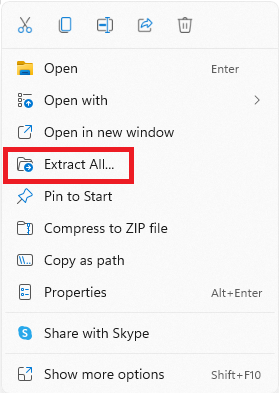
After successfully extract, you will find mangalam-events folder, mangalam_events_db database file and README document in the folder.

Step 3: Copy Project Folder
In this step, copy mangalam-events folder and paste into htdocs folder.
F:\xampp\htdocs\mangalam-events
Step 4: Create and Import Database
In this step, enter Database name and then click on Create button.

After successfully, click on Import tab and click Choose File then click Import button.

Step 5: Run Project
Congratulations! Run the project using the URL: http://localhost/mangalam-events
Admin URL: http://localhost/mangalam-events/admin
Username: admin
Password: Admin@123#$

View Demo
Download Source Code

Join 20,000+ subscriber