 WhatsApp us

How to Send WhatsApp Messages Using Infobip API in PHP
- Tech Area
- Last updated on: January 8, 2026
Sending WhatsApp messages programmatically is essential for businesses that want to automate notifications, alerts, and customer communication. In this guide, you’ll learn how to send WhatsApp messages using the Infobip API with PHP, including account setup, API configuration, and a working code example.
Files used in this tutorial:
1- connection.php (database connection file)
2- index.php
File Structure with Infobip API PHP Client

Installation Infobip APIs Client Library for PHP
Infobip APIs client library can be installed with Composer. Run this command in your project root to install this library:
composer require infobip/infobip-api-php-clientStep 1: Create a Database connection
In this step, create a new file connection.php to create database connection.
connection.php
<?php
$server = "localhost";
$username = "root";
$password = "";
$database = "whatsapp_db";
$connection = mysqli_connect($server,$username,$password);
$select_db = mysqli_select_db($connection, $database);
if(!$select_db)
{
	echo("connection terminated");
}
?>
Step 2: Create index.php file
<html>
<head>
    <title>Send WhatsApp Message using PHP</title>
    <link rel="stylesheet" href="https://maxcdn.bootstrapcdn.com/bootstrap/3.3.6/css/bootstrap.min.css"/>
</head>
<style>
 .box
 {
  width:100%;
  max-width:600px;
  background-color:#f9f9f9;
  border:1px solid #ccc;
  border-radius:5px;
  padding:16px;
  margin:0 auto;
 }
</style>
<?php
use Infobip\Configuration;
use Infobip\Api\WhatsAppApi;
use Infobip\Model\WhatsAppTextMessage;
use Infobip\Model\WhatsAppTextContent;

require 'vendor/autoload.php';
require 'connection.php';
if(isset($_POST['send_sms']))
{
  $number = $_POST['phone'];
  $msg = $_POST['msg'];

$configuration = new Configuration(
        host: 'e1mmwr.api.infobip.com',
        apiKey: 'YOUR-API-KEY'
    );
$whatsAppApi = new WhatsAppApi(config: $configuration);
$textMessage = new WhatsAppTextMessage(
        from: 'From-Number',
        to: $number,
        content: new WhatsAppTextContent(
            text: $msg
        )
    );

    $whatsAppApi = new WhatsAppApi(config: $configuration);

    $messageInfo = $whatsAppApi->sendWhatsAppTextMessage($textMessage);
    $insert_query = mysqli_query($connection, "insert into tbl_msg set phone_no='$number', message='$msg'");
    if($insert_query>0)
    {
      echo "<script>
      alert('Data Submitted.')</script>";
    }
  }
?>
<body>
    <div class="container">
    <div class="table-responsive">
    <h3 align="center">Send WhatsApp Message using PHP</h3>
    <form method="post">
     <div class="box">
      <div class="form-group">
       <label for="phone">Enter Your Mobile Number</label>
       <input type="text" name="phone" id="phone" placeholder="Enter Mobile Number" class="form-control" required/>
      </div>
      <div class="form-group">
       <label for="message">Enter Your Message</label>
       <textarea name="msg" id="msg" placeholder="Your Message" required class="form-control" rows="4"></textarea>
      </div>
      <div class="form-group">
       <input type="submit" id="send_sms" name="send_sms" value="Send" class="btn btn-success" />
       </div>
     </div>
   </form>
   </div>
  </div>
 </body>
</html>
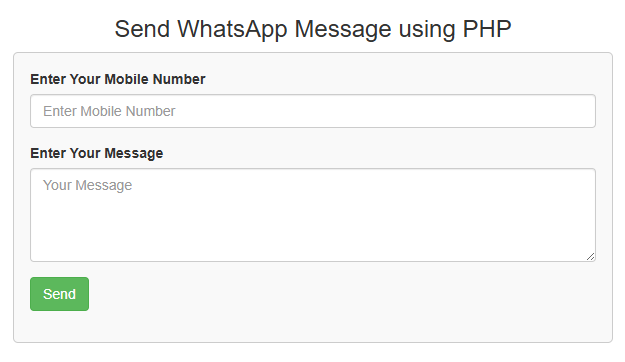
The screenshot below displays the user interface where users can enter their mobile number and message.
Download Source Code

Join 20,000+ subscriber