 WhatsApp us

How to set login attempts limit in PHP
- Tech Area
- Last updated on: January 8, 2026
In this tutorial, we discuss how to set login attempts limit in login form using PHP. If you are working on login module then you should add attempts limit functionality in it to secure the login form.
By the using of this functionality you can prevent someone to unauthorized access on your login form. You can set number of attempts limit and disable someone after failed given login attempts in PHP.
Files used in this tutorial:
1- connection.php (database connection file)
2- index.php (login form and validate login attempts limit)
3- dashboard.php (user will redirect to this page)
4- logout.php (user session will destroy)
Below are the step by step process of how to set login attempts limit in PHP.
Step 1: Create a Database connection
In this step, create a new file connection.php to create database connection.
connection.php
<?php
$server = "localhost";
$username = "root";
$password = "";
$database = "college_db";
$connection = mysqli_connect("$server","$username","$password");
$select_db = mysqli_select_db($connection, $database);
if(!$select_db)
{
	echo("connection terminated");
}
?>
Step 2: Create Login form
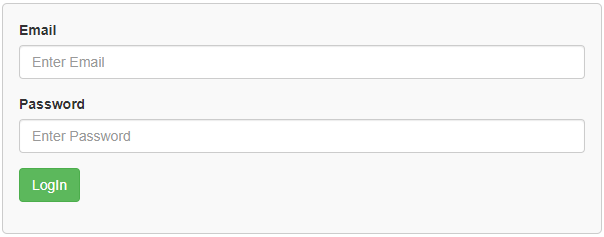
In this step, create a new file index.php. This is the main file used for login form. First, we will create an HTML form with two fields i.e email and password.
This screenshot shows the UI for login form.
index.php
<html>
<head>
    <title>Login Form</title>
    <link rel="stylesheet" href="https://maxcdn.bootstrapcdn.com/bootstrap/3.3.6/css/bootstrap.min.css" />
</head>
<style>
 .box
 {
  width:100%;
  max-width:600px;
  background-color:#f9f9f9;
  border:1px solid #ccc;
  border-radius:5px;
  padding:16px;
  margin:0 auto;
 }
 input.parsley-success,
 select.parsley-success,
 textarea.parsley-success {
   color: #468847;
   background-color: #DFF0D8;
   border: 1px solid #D6E9C6;
 }

 input.parsley-error,
 select.parsley-error,
 textarea.parsley-error {
   color: #B94A48;
   background-color: #F2DEDE;
   border: 1px solid #EED3D7;
 }

 .parsley-errors-list {
   margin: 2px 0 3px;
   padding: 0;
   list-style-type: none;
   font-size: 0.9em;
   line-height: 0.9em;
   opacity: 0;

   transition: all .3s ease-in;
   -o-transition: all .3s ease-in;
   -moz-transition: all .3s ease-in;
   -webkit-transition: all .3s ease-in;
 }

 .parsley-errors-list.filled {
   opacity: 1;
 }

 .parsley-type, .parsley-required, .parsley-equalto{
  color:#ff0000;
 }
.error
{
  color: red;
  font-weight: 700;
}
</style>
<body>
    <div class="container">
    <div class="table-responsive">
    <h3 align="center">Login Form</h3><br/>
    <div class="box">
     <form id="validate_form" method="post" >
       <div class="form-group">
       <label for="email">Email</label>
       <input type="text" name="email" id="email" placeholder="Enter Email" required data-parsley-type="email" data-parsley-trigg
       er="keyup" class="form-control" />
      </div>
      <div class="form-group">
       <label for="password">Password</label>
       <input type="password" name="pwd" id="pwd" placeholder="Enter Password" required  data-parsley-trigger="keyup" class="form-control" />
      </div>
      <div class="form-group">
       <input type="submit" id="login" name="login" value="LogIn" class="btn btn-success" />
       </div>
       <p class="error"><?php if(!empty($msg)){ echo $msg; } ?></p>
     </form>
     </div>
   </div>
  </div>
 </body>
</html>
Now create a function for IP address.
function getIpAddr(){
if (!empty($_SERVER['HTTP_CLIENT_IP'])){
$ipAddr=$_SERVER['HTTP_CLIENT_IP'];
}elseif (!empty($_SERVER['HTTP_X_FORWARDED_FOR'])){
$ipAddr=$_SERVER['HTTP_X_FORWARDED_FOR'];
}else{
$ipAddr=$_SERVER['REMOTE_ADDR'];
}
return $ipAddr;
}
After this, we will store the IP address in a variable and also create a variable for time and get the login attempt count on the basis of IP address and login time.
$ip = getIpAddr(); //storing IP address
$login_time = time()-30; //after given attempts user can't login for 30 seconds
//checking login attempt count on the basis of IP address and login time
$login_attempts = mysqli_query($connection,"select count(*) as total_count from ip_details where ip='$ip' and login_time>'$login_time'");
$res = mysqli_fetch_assoc($login_attempts);
$count = $res['total_count'];
If login attempt count equal to 3, it will show error message “Your account has been blocked. Please try after 30 seconds.” otherwise it will check the login credentials. If credentials are correct, then it will delete the record on the basis of IP address and the user will redirect to dashboard.php.
If credentials do not match, then the program will check for the remaining login attempt. If a remaining login attempt is 0 it will show error message “Your account has been blocked. Please try after 30 seconds.” else it will show “Please enter valid details. $remaining_attempts attempts remaining”.
if($count==3)
  {
    $msg = "Your account has been blocked. Please try after 30 seconds.";
  }
  else
  {
  $email = $_REQUEST['email'];
  $pwd = md5($_REQUEST['pwd']);
  $select_query = mysqli_query($connection,"select * from tbl_student where email='$email' and password='$pwd'");
  $res = mysqli_num_rows($select_query);
  if($res>0)
  {
    $delete_query = mysqli_query($connection,"delete from ip_details where ip='$ip'");
    $fetch_data = mysqli_fetch_array($select_query);
    $name = $fetch_data['name'];
    $_SESSION['name'] = $name;
    header('location:dashboard.php');
  }
  else
  {
    $count++;
    $remaining_attempts = 3-$count;
    if($remaining_attempts==0)
    {
      $msg = "Your account has been blocked. Please try after 30 seconds.";
    }
    else
    {
      $msg = "Please enter valid details. $remaining_attempts attempts remaining.";
    }
    $ip = $_SERVER['REMOTE_ADDR'];
    $login_time = time();
    $insert_query = mysqli_query($connection,"insert into ip_details set ip='$ip', login_time='$login_time'");

  }
}
Step 3: Create dashboard file
In this step, create a new file dashboard.php.
dashboard.php
<?php
session_start();
if(empty($_SESSION['name']))
{
	header('location:index.php');
}
$name = $_SESSION['name'];
?>
<center><h2>Welcome <?php echo $name; ?>, to the dashboard</h2></center>
<center><p><a href="logout.php">Logout</a></p>
Step 4: Create logout file
In this step, create a new file logout.php.
logout.php
<?php
session_start();
unset($_SESSION['name']);
header('location:index.php');
?>
Source Code
Here is the full code that we have written for index.php.
<html>
<head>
    <title>Login Form</title>
    <link rel="stylesheet" href="https://maxcdn.bootstrapcdn.com/bootstrap/3.3.6/css/bootstrap.min.css" />
</head>
<style>
 .box
 {
  width:100%;
  max-width:600px;
  background-color:#f9f9f9;
  border:1px solid #ccc;
  border-radius:5px;
  padding:16px;
  margin:0 auto;
 }
 input.parsley-success,
 select.parsley-success,
 textarea.parsley-success {
   color: #468847;
   background-color: #DFF0D8;
   border: 1px solid #D6E9C6;
 }

 input.parsley-error,
 select.parsley-error,
 textarea.parsley-error {
   color: #B94A48;
   background-color: #F2DEDE;
   border: 1px solid #EED3D7;
 }

 .parsley-errors-list {
   margin: 2px 0 3px;
   padding: 0;
   list-style-type: none;
   font-size: 0.9em;
   line-height: 0.9em;
   opacity: 0;

   transition: all .3s ease-in;
   -o-transition: all .3s ease-in;
   -moz-transition: all .3s ease-in;
   -webkit-transition: all .3s ease-in;
 }

 .parsley-errors-list.filled {
   opacity: 1;
 }

 .parsley-type, .parsley-required, .parsley-equalto{
  color:#ff0000;
 }
.error
{
  color: red;
  font-weight: 700;
}
</style>
<?php
session_start();
include('connection.php');
if(isset($_REQUEST['login']))
{
  $ip = getIpAddr();
  $login_time = time()-30;
  $login_attempts = mysqli_query($connection,"select count(*) as total_count from ip_details where ip='$ip' and login_time>'$login_time'");
  $res = mysqli_fetch_assoc($login_attempts);
  $count = $res['total_count'];
  if($count==3)
  {
    $msg = "Your account has been blocked. Please try after 30 seconds.";
  }
  else
  {
  $email = $_REQUEST['email'];
  $pwd = md5($_REQUEST['pwd']);
  $select_query = mysqli_query($connection,"select * from tbl_student where email='$email' and password='$pwd'");
  $res = mysqli_num_rows($select_query);
  if($res>0)
  {
    $delete_query = mysqli_query($connection,"delete from ip_details where ip='$ip'");
    $fetch_data = mysqli_fetch_array($select_query);
    $name = $fetch_data['name'];
    $_SESSION['name'] = $name;
    header('location:dashboard.php');
  }
  else
  {
    $count++;
    $remaining_attempts = 3-$count;
    if($remaining_attempts==0)
    {
      $msg = "Your account has been blocked. Please try after 30 seconds.";
    }
    else
    {
      $msg = "Please enter valid details. $remaining_attempts attempts remaining.";
    }
    $ip = $_SERVER['REMOTE_ADDR'];
    $login_time = time();
    $insert_query = mysqli_query($connection,"insert into ip_details set ip='$ip', login_time='$login_time'");

  }
}

}
function getIpAddr(){
if (!empty($_SERVER['HTTP_CLIENT_IP'])){
$ipAddr=$_SERVER['HTTP_CLIENT_IP'];
}elseif (!empty($_SERVER['HTTP_X_FORWARDED_FOR'])){
$ipAddr=$_SERVER['HTTP_X_FORWARDED_FOR'];
}else{
$ipAddr=$_SERVER['REMOTE_ADDR'];
}
return $ipAddr;
}
?>
 <body>
    <div class="container">
    <div class="table-responsive">
    <h3 align="center">Login Form</h3><br/>
    <div class="box">
     <form id="validate_form" method="post" >
       <div class="form-group">
       <label for="email">Email</label>
       <input type="text" name="email" id="email" placeholder="Enter Email" required data-parsley-type="email" data-parsley-trigg
       er="keyup" class="form-control" />
      </div>
      <div class="form-group">
       <label for="password">Password</label>
       <input type="password" name="pwd" id="pwd" placeholder="Enter Password" required  data-parsley-trigger="keyup" class="form-control" />
      </div>
      <div class="form-group">
       <input type="submit" id="login" name="login" value="LogIn" class="btn btn-success" />
       </div>
       <p class="error"><?php if(!empty($msg)){ echo $msg; } ?></p>
     </form>
     </div>
   </div>
  </div>
 </body>
</html>
Download Source Code

Join 20,000+ subscriber