 WhatsApp us

How to send Email using Gmail SMTP in PHP
- Tech Area
- Last updated on: January 8, 2026
In this tutorial, we have discuss how to send email using Gmail smtp in PHP. If you are working on a website in which you have to send acknowledgement email after form submission with some details then this tutorial is for you.
We will also discuss that how to enable IMAP and create app passwords in Gmail step by step. because without enabling these gmail settings we can not send email.
Below are the step by step process.
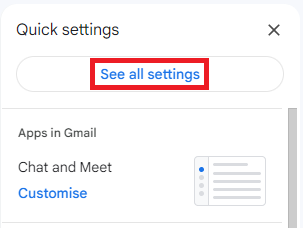
Step 1: Click on Settings button then click on See all settings
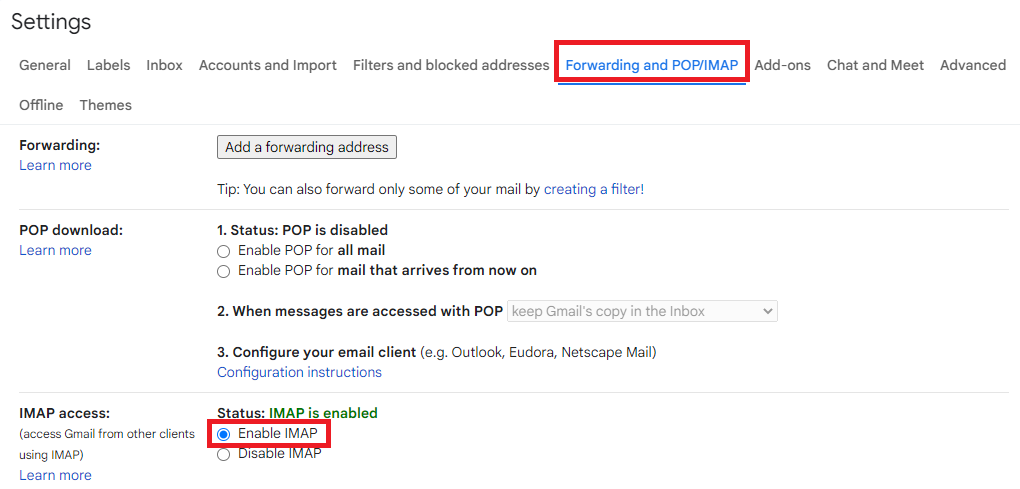
Step 2: Click on Forwarding and POP/IMAP then Enable IMAP
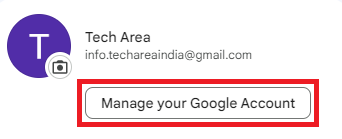
Step 3: Click on Manage your Google Account
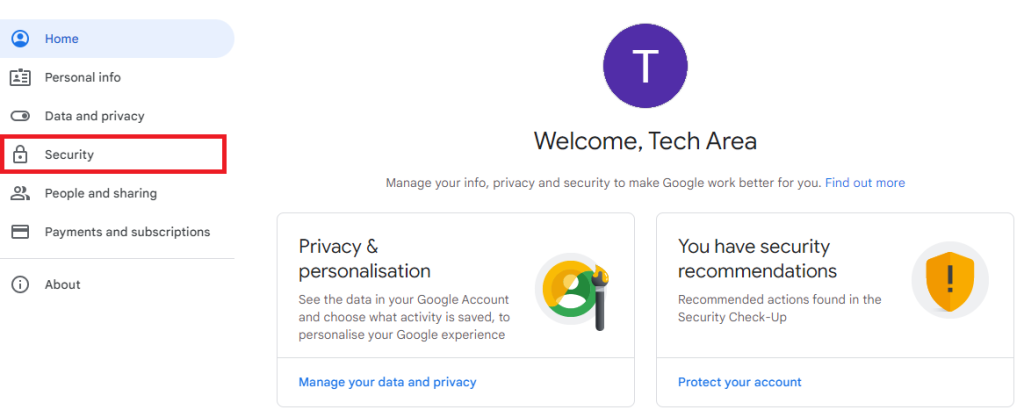
Step 4: Now, click on Security tab in the left side
Step 5: Now first TURN ON 2-Step Verification
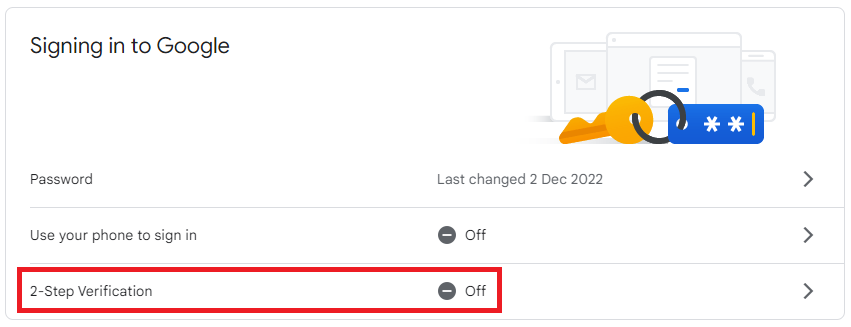
Step 6: After successful 2-Step Verification Turn on, you will see App passwords options
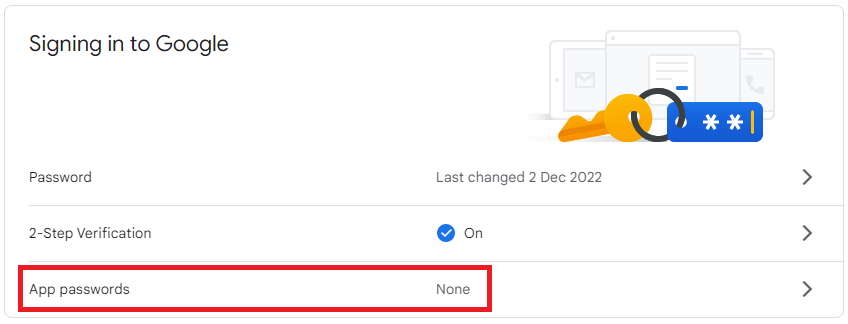
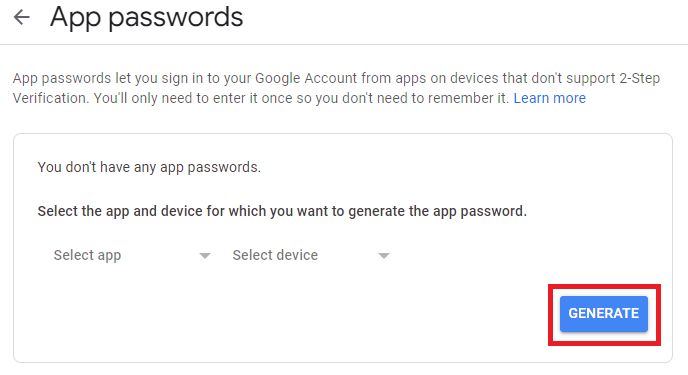
Step 7: Click on App passwords, then select app and click on GENERATE button
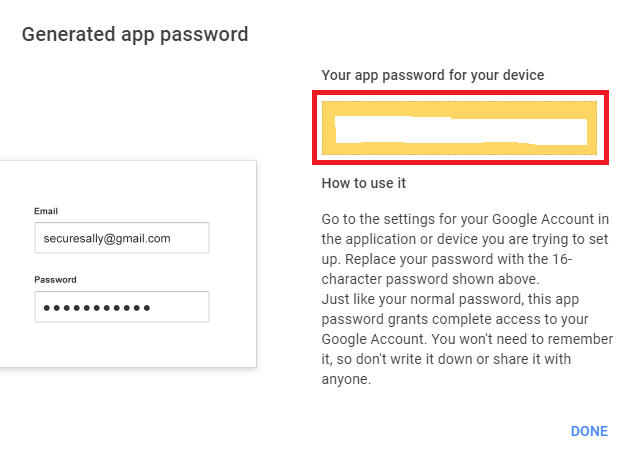
Step 8: App password generated successfully
Source Code
connection.php
<?php
$server = "localhost";
$username = "root";
$password = "";
$database = "college_db";
$connection = mysqli_connect("$server","$username","$password","$database");
if(!$connection)
{
	echo("connection terminated");
}
?>
index.php
<html>
<head>
    <title>Contact Form</title>
    <link rel="stylesheet" href="https://maxcdn.bootstrapcdn.com/bootstrap/3.3.6/css/bootstrap.min.css"/>
</head>
<style>
 .box
 {
  width:100%;
  max-width:600px;
  background-color:#f9f9f9;
  border:1px solid #ccc;
  border-radius:5px;
  padding:16px;
  margin:0 auto;
 }
 input.parsley-success,
 select.parsley-success,
 textarea.parsley-success {
   color: #468847;
   background-color: #DFF0D8;
   border: 1px solid #D6E9C6;
 }

 input.parsley-error,
 select.parsley-error,
 textarea.parsley-error {
   color: #B94A48;
   background-color: #F2DEDE;
   border: 1px solid #EED3D7;
 }

 .parsley-errors-list {
   margin: 2px 0 3px;
   padding: 0;
   list-style-type: none;
   font-size: 0.9em;
   line-height: 0.9em;
   opacity: 0;

   transition: all .3s ease-in;
   -o-transition: all .3s ease-in;
   -moz-transition: all .3s ease-in;
   -webkit-transition: all .3s ease-in;
 }

 .parsley-errors-list.filled {
   opacity: 1;
 }

 .parsley-type, .parsley-required, .parsley-equalto{
  color:#ff0000;
 }
 .msg{
  color:  red;
 }
</style>
<?php
include_once('connection.php');
if(isset($_REQUEST['name']))
{
  $name = $_REQUEST['name'];
  $email = $_REQUEST['email'];
  $mobile = $_REQUEST['mobile'];
  $message = $_REQUEST['msg'];

$insert_query = mysqli_query($connection,"insert into contact_form set Name='$name', Email_Id='$email', Mobile='$mobile', Message='$message'");

if($insert_query)
{
$msg = '<div>
<p>'.ucfirst($name).' has submitted contact form.</p>
<p><b>Name:</b> '.($name).'</p>
<p><b>Email:</b> '.($email).'</p>
<p><b>Mobile:</b> '.($mobile).'</p>
<p><b>Message:</b> '.($message).'</p>
</div>';

include_once("smtpmail/class.phpmailer.php");
$email = "";
$mail = new PHPMailer;
$mail->IsSMTP();
$mail->SMTPAuth = true;
$mail->SMTPSecure = "tls";
$mail->Host = 'smtp.gmail.com';
$mail->Port = 587;
$mail->Username = "";       //your email address
$mail->Password = "";       //your 16 digits app password
$mail->FromName = "Tech Area";
$mail->AddAddress($email);
$mail->Subject = "Enquiry";
$mail->isHTML( TRUE );
$mail->Body =$msg;
if($mail->send())
   {
    $success =  "Feedback submitted successfully";
   }
 }
}
?>
<body>
    <div class="container">
    <div class="table-responsive">
    <h3 align="center">Contact Form</h3><br/>
    <div class="box">
     <form id="validate_form" method="post">
      <div class="form-group">
       <label>Name</label>
       <input type="text" name="name" id="name" placeholder="Enter Name" required data-parsley-pattern="^[a-zA-Z]+$" data-parsley-trigger="keyup" class="form-control" />
      </div>
      <div class="form-group">
       <label for="email">Email</label>
       <input type="text" name="email" id="email" placeholder="Enter Email" required data-parsley-type="email" data-parsley-trigger="keyup" class="form-control" />
      </div>
      <div class="form-group">
       <label for="mobile">Mobile No.</label>
       <input type="text" name="mobile" id="mobile" placeholder="Enter Mobile" required  data-parsley-trigger="keyup" class="form-control" />
      </div>
      <div class="form-group">
       <label for="msg">Message</label>
       <textarea name="msg" id="msg" placeholder="Enter your message" required  data-parsley-trigger="keyup" class="form-control"></textarea>
      </div>
       <div class="form-group">
       <input type="submit" id="submit" name="submit" value="Submit" class="btn btn-success">
       </div>
     </form>
     <div class="msg"><?php if(!empty($success)) { echo $success; }?></div>
    </div>
   </div>
  </div>
 </body>
</html>
Download Source Code

Join 20,000+ subscriber