 WhatsApp us

How to sanitize input data in PHP
- Tech Area
- Last updated on: January 8, 2026
In this tutorial, We will see how to use filter_input() function to sanitize form input data in php. We are using filter_input() function to sanitize input field like name, email and number.
Files used in this tutorial:
1- index.php (registration form with filter_input() function)
Create a file for registration form
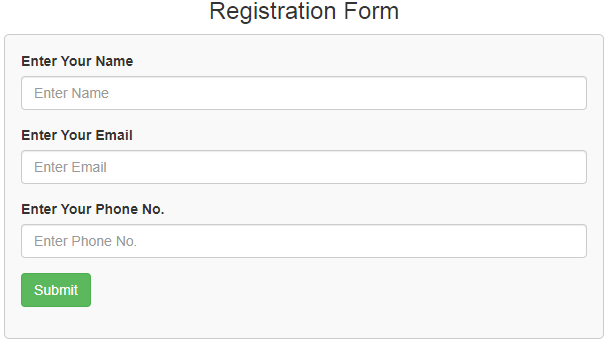
Now create a new file index.php This is the main file used for registration form and sanitize input data.
This screenshot shows the registration form.
index.php
<html>
<head>
    <title>Registration Form</title>
    <link rel="stylesheet" href="https://maxcdn.bootstrapcdn.com/bootstrap/3.3.6/css/bootstrap.min.css" />
</head>
<style>
 .box
 {
  width:100%;
  max-width:600px;
  background-color:#f9f9f9;
  border:1px solid #ccc;
  border-radius:5px;
  padding:16px;
  margin:0 auto;
 }
 .msg
{
  color: red;
  font-weight: 700;
}
</style>
<?php
$msg="";
if(isset($_POST['register']))
{
  $name = filter_input(INPUT_POST, "name", FILTER_SANITIZE_SPECIAL_CHARS);
  $email = filter_input(INPUT_POST, "email", FILTER_SANITIZE_EMAIL);
  $phone = filter_input(INPUT_POST, "phone", FILTER_SANITIZE_NUMBER_INT);
  if(!empty($name))
  {
    $msg = "You have entered $name";
  }
  else if(!empty($email))
  {
    $msg = "You have entered $email";
  }
  else if(!empty($phone))
  {
    $msg = "You have entered $phone";
  }
  else
  {
    $msg = "Error!";
  }
}
?>
<body>
    <div class="container">
    <div class="table-responsive">
    <h3 align="center">Registration Form</h3>
    <div class="box">
     <form method="post">
     <div class="form-group">
       <label for="name">Enter Your Name</label>
       <input type="text" name="name" id="name" placeholder="Enter Name" class="form-control"/>
      </div>
       <div class="form-group">
       <label for="email">Enter Your Email</label>
       <input type="text" name="email" id="email" placeholder="Enter Email" class="form-control"/>
      </div>
      <div class="form-group">
       <label for="phone">Enter Your Phone No.</label>
       <input type="text" name="phone" id="phone" placeholder="Enter Phone No." class="form-control"/>
      </div>
       <div class="form-group">
       <input type="submit" id="register" name="register" value="Submit" class="btn btn-success" />
       </div>
       <p class="msg"><?php if(!empty($msg)){ echo $msg; } ?></p>
     </form>
     </div>
   </div>
  </div>
 </body>
</html>
Subscribe us via Email
Join 20,000+ subscriber
PHP Projects
Employee Attendance & Leave Management System project in PHP & MySQL
Last Updated: January 24, 2026
Matrimonial Portal Project in PHP & MySQL
Last Updated: December 22, 2025
Event Management System Project in PHP & MySQL
Last Updated: December 6, 2025
Online Shopping System Project in PHP MySQL
Last Updated: November 26, 2025
Student record system project in PHP and MySQL
Last Updated: July 3, 2024
Food ordering system project in PHP and MySQL
Last Updated: June 27, 2024
Tourism management system project in PHP and MySQL
Last Updated: June 24, 2024
Restaurant table booking system project in PHP and MySQL
Last Updated: February 22, 2024
Hostel management system project in PHP and MySQL
Last Updated: February 14, 2024
Online Pizza Delivery project in PHP
Last Updated: February 4, 2024
Parking Management System project in PHP
Last Updated: November 5, 2023
Employee Attendance Management System project in PHP MySQL
Last Updated: October 3, 2023
Visitors Management System project in PHP
Last Updated: August 28, 2023
Library Management System project in PHP and MySQL Updated 2026
Last Updated: May 29, 2023
Expense Management System project in PHP and MySQL
Last Updated: May 22, 2023
Hospital Management System project in PHP and MySQL
Last Updated: May 5, 2023
Online quiz with e-certificate in PHP CodeIgniter with MySQL
Last Updated: April 29, 2023
SNIPE – IT Asset management system v6.1.0
Last Updated: April 21, 2023
Online Quiz System project in PHP CodeIgniter with MySQL
Last Updated: February 8, 2023
Employee Management System project in PHP
Last Updated: January 21, 2023