 WhatsApp us

How to print web page using JavaScript
- Tech Area
- Last updated on: January 8, 2026
In this tutorials, We will learn how to print web page using JavaScript. If you want to take a print of HTML web page with help of JavaScript then this tutorials helps you to achieve this task quickly by the using of print() method.
The print() method prints the HTML content of the current webpage that may includes the text, images tables etc.
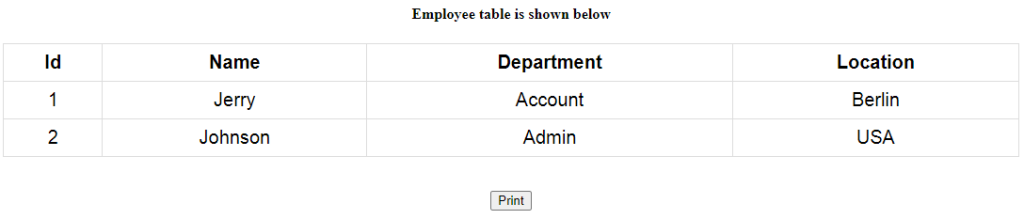
In the starting we have to create a HTML web page that includes a table.
This screenshot shows the table.
<div id="printThis">
<div class="container">
	<br><br>
	<center><h4>Employee table is shown below</h4></center>
	<center>
		<table>
			<tr>
				<th>Id</th>
				<th>Name</th>
				<th>Department</th>
				<th>Location</th>
			</tr>
			<tr>
				<td>1</td>
				<td>Jerry</td>
				<td>Account</td>
				<td>Berlin</td>
			</tr>
			<tr>
				<td>2</td>
				<td>Johnson</td>
				<td>Admin</td>
				<td>USA</td>
			</tr>
		</table>
	</center>
	<br><br>
</div>
</div>
<center>
	<input type="submit" value="Print" id="Printbtn" class="btn btn-primary">
</center>
Now we have to add the style.
<style>
table{
	font-family: arial, sans-serif;
	border-collapse: collapse;
	width: 80%;
}
td, th{
	border: 1px solid #dddddd;
	text-align: center;
	padding: 8px;
	color: black;
	font-size: 20px;
}
@media screen{
	#printSection{
	display: none;
	}
}
@media print{
	body *{
	visibility: hidden;
	}
	#printSection, #printSection * {
	visibility: visible;
	}
	#printSection{
	position: absolute;
	left:0;
	top:0;
	width: 100%;
	}
}
</style>
Now we have to write the JavaScript code to take the print by the click of Print button using window.print() method.
<script>
	document.getElementById("Printbtn").onclick = function(){
		printElement(document.getElementById("printThis"));
	}

	function printElement(elem){
		var domClone = elem.cloneNode(true);
		var $printSection = document.getElementById("printSection");
		if(!$printSection){
			var $printSection = document.createElement("div");
			$printSection.id = "printSection";
			document.body.appendChild($printSection);
		}
		$printSection.innerHTML = "";
		$printSection.appendChild(domClone);
		window.print();
	}
</script>
Output
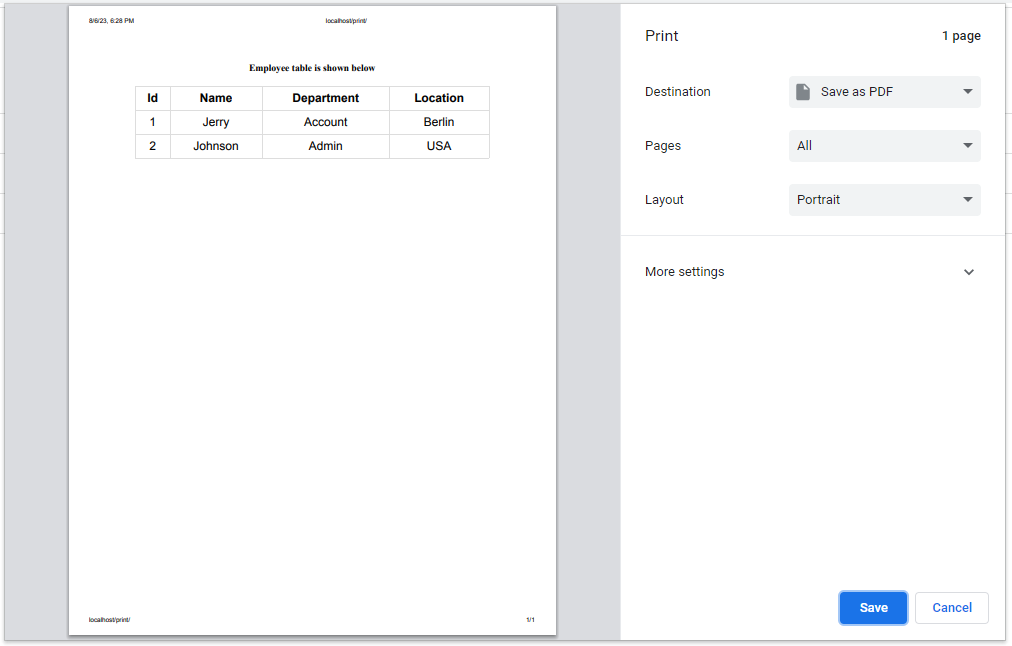
This screenshot shows the print screen.
Source Code
Here is the full code that we have written for index.php.
<style>
table{
	font-family: arial, sans-serif;
	border-collapse: collapse;
	width: 80%;
}
td, th{
	border: 1px solid #dddddd;
	text-align: center;
	padding: 8px;
	color: black;
	font-size: 20px;
}
@media screen{
	#printSection{
	display: none;
	}
}
@media print{
	body *{
	visibility: hidden;
	}
	#printSection, #printSection * {
	visibility: visible;
	}
	#printSection{
	position: absolute;
	left:0;
	top:0;
	width: 100%;
	}
}
</style>
<div id="printThis">
<div class="container">
	<br><br>
	<center><h4>Employee table is shown below</h4></center>
	<center>
		<table>
			<tr>
				<th>Id</th>
				<th>Name</th>
				<th>Department</th>
				<th>Location</th>
			</tr>
			<tr>
				<td>1</td>
				<td>Jerry</td>
				<td>Account</td>
				<td>Berlin</td>
			</tr>
			<tr>
				<td>2</td>
				<td>Johnson</td>
				<td>Admin</td>
				<td>USA</td>
			</tr>
		</table>
	</center>
	<br><br>
</div>
</div>
<center>
	<input type="submit" value="Print" id="Printbtn" class="btn btn-primary">
</center>
<script>
	document.getElementById("Printbtn").onclick = function(){
		printElement(document.getElementById("printThis"));
	}

	function printElement(elem){
		var domClone = elem.cloneNode(true);
		var $printSection = document.getElementById("printSection");
		if(!$printSection){
			var $printSection = document.createElement("div");
			$printSection.id = "printSection";
			document.body.appendChild($printSection);
		}
		$printSection.innerHTML = "";
		$printSection.appendChild(domClone);
		window.print();
	}
</script>Download Source Code

Join 20,000+ subscriber