 WhatsApp us

How to prevent direct access to pages without login in PHP
- Tech Area
- Last updated on: January 8, 2026
In this tutorials, We will learn how to prevent direct access to pages without login in PHP and MySQL.
Files used in this tutorial:
1- connection.php (database connection file)
2- index.php (login form)
3- dashboard.php
4- logout.php
Below are the step by step process of how to prevent direct access to pages without login in PHP and MySQL.
Step 1: Create a Database connection
In this step, create a new file connection.php to create database connection.
connection.php
<?php
$server = "localhost";
$username = "root";
$password = "";
$database = "college_db";
$connection = mysqli_connect("$server","$username","$password");
$select_db = mysqli_select_db($connection, $database);
if(!$select_db)
{
	echo("connection terminated");
}
?>
Step 2: Create Login form
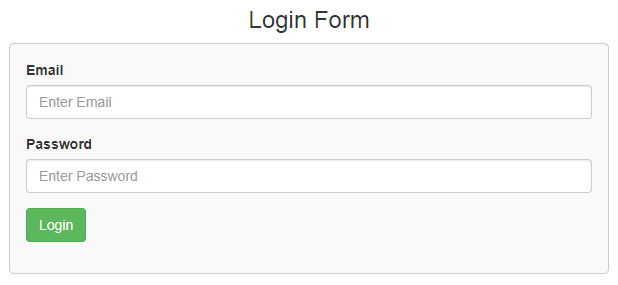
In this step, create a new file index.php. This is the main file used to create login form and validate users login credentials.
This screenshot shows the login form.
index.php
<html>
<head>
    <title>Login Form</title>
    <link rel="stylesheet" href="https://maxcdn.bootstrapcdn.com/bootstrap/3.3.6/css/bootstrap.min.css" />
</head>
<style>
 .box
 {
  width:100%;
  max-width:600px;
  background-color:#f9f9f9;
  border:1px solid #ccc;
  border-radius:5px;
  padding:16px;
  margin:0 auto;
 }
 .msg
{
  color: red;
  font-weight: 700;
}
</style>
<?php
session_start();
include('connection.php');
if(isset($_REQUEST['login']))
{
  $email = $_REQUEST['email'];
  $pwd = md5($_REQUEST['pwd']);
   $select_query = mysqli_query($connection,"select * from tbl_student where email='$email' and password='$pwd'");
  $res = mysqli_num_rows($select_query);
  if($res>0)
  {
    $data = mysqli_fetch_array($select_query);
    $name = $data['name'];
    $_SESSION['name'] = $name;
    header('location:dashboard.php');
  }
  else
  {
    $msg = "Please enter valid Emailid or Password.";
  }
}
?>
<body>
    <div class="container">
    <div class="table-responsive">
    <h3 align="center">Login Form</h3>
    <form method="post">
     <div class="box">
      <div class="form-group">
       <label for="email">Email</label>
       <input type="text" name="email" id="email" placeholder="Enter Email" class="form-control" required />
      </div>
      <div class="form-group">
       <label for="password">Password</label>
       <input type="password" name="pwd" id="pwd" placeholder="Enter Password" class="form-control" required/>
      </div>
      <div class="form-group">
       <input type="submit" id="login" name="login" value="Login" class="btn btn-success"/>
      </div>
       <p class="msg"><?php if(!empty($msg)){ echo $msg; } ?></p>
     </div>
   </form>
   </div>
  </div>
 </body>
</html>
Step 3: Create dashboard file
In this step, create a new file dashboard.php to display session information with welcome message.
dashboard.php
<?php
session_start();
if(empty($_SESSION['name']))
{
	header('location:index.php');
}
if(!empty($_SESSION['name']))
{
$username = $_SESSION['name'];
}
?>
<center><h2>Welcome, <?php if(!empty($username)){ echo $username; }?> to the dashboard</h2></center>
<center><h3><a href="logout.php">Logout</a></h3></center>
Step 4: Create logout file
In this step, create a new file logout.php to unset session.
logout.php
<?php
session_start();
unset($_SESSION['name']);
header('location:index.php');
?>Download Source Code

Join 20,000+ subscriber