 WhatsApp us

How to generate bulk certificate in PHP using FPDF
- Tech Area
- Last updated on: January 8, 2026
In this tutorial, we discuss how to generate dynamic bulk certificate in PHP. To generate dynamic certificate you have to download FPDF. FPDF is a PHP class which allows to generate PDF files with pure PHP, that is to say without using the PDFlib library.
Files used in this tutorial:
1- connection.php (database connection file)
2- index.php (to generate bulk certificate)
Below are the step by step process of how to generate bulk certificate in PHP using FPDF.
Step 1: Create a Database connection
In this step, create a new file connection.php to create database connection.
connection.php
<?php
$server = "localhost";
$username = "root";
$password = "";
$database = "college_db";
$connection = mysqli_connect("$server","$username","$password");
$select_db = mysqli_select_db($connection, $database);
if(!$select_db)
{
	echo("connection terminated");
}
?>
Step 2: Create and Import Database
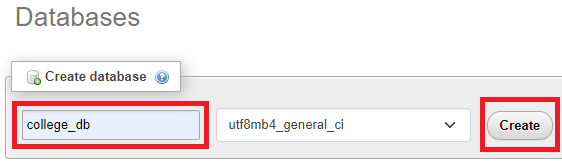
In this step, enter Database name and then click on Create button.
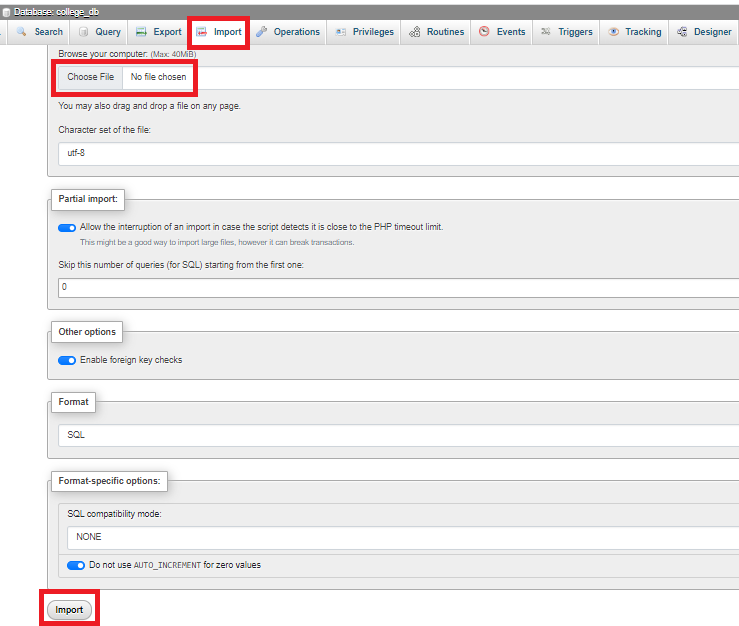
After successfully, click on Import tab and click Choose File then click Import button.
Step 3: Click on below link to download FPDF
Step 4: Design a certificate in .jpg/.jpeg format

Step 5: Download any suitable font file for certificate
In this step, download ‘Calibri_Regular’ font file.
Step 6: Create a folder to store dynamically generated certificate
In this step, create folder name ‘download-certificate’ to store dynamically generated certificate.
Step 7: Create index.php
In this step, create a new file index.php. This is the main file used to generate certificate.
index.php
<?php
require('connection.php');
require('fpdf/fpdf.php');
header('content-type:image/jpeg');
$font = "C:/xamppp/htdocs/certificate/Calibri_Regular.ttf";
$select_query = mysqli_query($connection,"select * from certificate_details");
while($certificate = mysqli_fetch_array($select_query))
{
	$image = imagecreatefromjpeg("E-Certificate.jpg");
	$color = imagecolorallocate($image, 19,21,22);
	$id = $certificate['reference_no'];
	$name = $certificate['name'];
	imagettftext($image, 90,0,690,800, $color, $font, $id);
	imagettftext($image, 90,0,1110,800, $color, $font, $name);
	imagejpeg($image,"download-certificate/$id.jpg");
	imagedestroy($image);
}
?>
Step 8: Run the Program
Run the program using the URL: http://localhost/certificate/
Download Source Code

Join 20,000+ subscriber