 WhatsApp us

Difference between fetch_object(), fetch_row(), fetch_assoc() and fetch_array()
- Tech Area
- Last updated on: January 8, 2026
In this tutorials, We will learn about PHP MySQLi fetch functions and see the difference between MySQLi_fetch_object(), MySQLi_fetch_row(), MySQLi_fetch_assoc() and MySQLi_fetch_array() functions.
All of These functions used to fetch the result from the database with a similar process. Let us consider the tbl_student table. The table data and structure is as follows.

mysqli_fetch_row()
This function will fetch a result row and returns as an enumerated array. This function will return a row in the order as they are defined in the query.
<?php
  $connection = mysqli_connect("localhost", "root", "", "college_db");
  $select_query = mysqli_query($connection,"select * from tbl_student");
  $result = mysqli_fetch_row($select_query);
  print"<pre>";
  print_r($result);
  ?>
This program will return values of the entire first row since the row pointer is at the beginning. So the output will be as shown below.
Array
(
    [0] => 1
    [1] => david
    [2] => 1990-06-23
    [3] => david@xyz.com
    [4] => 9876543210
    [5] => user-dummy.jpg
)
If we want to get all the row information, we should do the same process through a loop.
<table>
  <tr>
    <th>Id</th>
    <th>Name</th>
    <th>Date of Birth</th>
    <th>EmailId</th>
    <th>Mobile</th>
    <th>Photo</th>
   </tr>
  <?php
  $connection = mysqli_connect("localhost", "root", "", "college_db");
  $select_query = mysqli_query($connection,"select * from tbl_student");
  while($result = mysqli_fetch_row($select_query)){
  ?>
  <tr>
  <td><?php echo $result[0]; ?></td>
  <td><?php echo $result[1]; ?></td>
  <td><?php echo $result[2]; ?></td>
  <td><?php echo $result[3]; ?></td>
  <td><?php echo $result[3]; ?></td>
  <td><img width="60" src="photo/<?php echo $result[5]; ?>"></td>
  </tr>
  <?php } ?>
 </table>
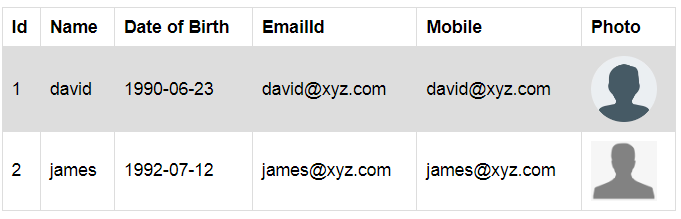
The output will be as shown below.
mysqli_fetch_assoc()
This function will fetch a result row and returns as an associative array. This function will return a row as an associative array where the column names will be the keys storing corresponding value.
<?php
  $connection = mysqli_connect("localhost", "root", "", "college_db");
  $select_query = mysqli_query($connection,"select * from tbl_student");
  $result = mysqli_fetch_assoc($select_query);
  print"<pre>";
  print_r($result);
  ?>
This program will return values of the entire first row since the row pointer is at the beginning. So the output will be as shown below.
Array
(
    [id] => 1
    [name] => david
    [dob] => 1990-06-23
    [email] => david@xyz.com
    [mobile] => 9876543210
    [photo] => user-dummy.jpg
)
If we want to get all the row information, we should do the same process through a loop.
<table>
  <tr>
  	<th>Id</th>
    <th>Name</th>
    <th>Date of Birth</th>
    <th>EmailId</th>
    <th>Mobile</th>
    <th>Photo</th>
   </tr>
  <?php
  $connection = mysqli_connect("localhost", "root", "", "college_db");
  $select_query = mysqli_query($connection,"select * from tbl_student");
  while($result = mysqli_fetch_assoc($select_query)){
  ?>
  <tr>
  <td><?php echo $result['id']; ?></td>
  <td><?php echo $result['name']; ?></td>
  <td><?php echo $result['dob']; ?></td>
  <td><?php echo $result['email']; ?></td>
  <td><?php echo $result['mobile']; ?></td>
  <td><img width="60" src="photo/<?php echo $result['photo']; ?>"></td>
  </tr>
  <?php } ?>
 </table>
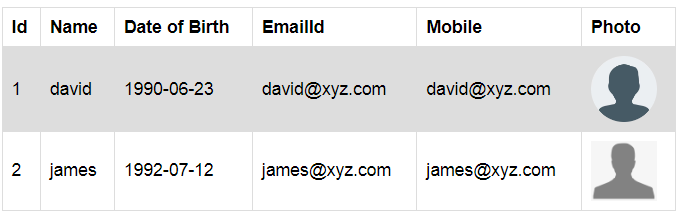
The output will be as shown below.
mysqli_fetch_array()
This function will fetch a result row as an associative array and enumerated array. This function will return a row as an associative array and enumerated array. It will have both numeric and string keys.
<?php
  $connection = mysqli_connect("localhost", "root", "", "college_db");
  $select_query = mysqli_query($connection,"select * from tbl_student");
  $result = mysqli_fetch_array($select_query);
  print"<pre>";
  print_r($result);
  ?>
The output will be as shown below.
Array
(
    [0] => 1
    [id] => 1
    [1] => david
    [name] => david
    [2] => 1990-06-23
    [dob] => 1990-06-23
    [3] => david@xyz.com
    [email] => david@xyz.com
    [4] => 9876543210
    [mobile] => 9876543210
    [5] => user-dummy.jpg
    [photo] => user-dummy.jpg
)
mysqli_fetch_object()
This function will fetch a result row as an object. This function will return data with same structure as returned by mysqli_fetch_assoc(). mysqli_fetch_object() returns object whereas mysqli_fetch_assoc() returns array.
<table>
  <tr>
    <th>Id</th>
    <th>Name</th>
    <th>Date of Birth</th>
    <th>EmailId</th>
    <th>Mobile</th>
    <th>Photo</th>
   </tr>
  <?php
  $connection = mysqli_connect("localhost", "root", "", "college_db");
  $select_query = mysqli_query($connection,"select * from tbl_student");
  while($result = mysqli_fetch_object($select_query)){
  ?>
  <tr>
  <td><?php echo $result->id; ?></td>
  <td><?php echo $result->name; ?></td>
  <td><?php echo $result->dob; ?></td>
  <td><?php echo $result->email; ?></td>
  <td><?php echo $result->mobile; ?></td>
  <td><img width="60" src="photo/<?php echo $result->photo; ?>"></td>
  </tr>
  <?php } ?>
 </table>
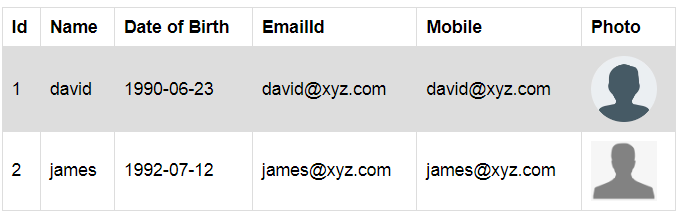
The output will be as shown below.

Join 20,000+ subscriber